Rusty cows

If you think about computer programming languages you normally don't associate cows with that thought, I however do, why? Well, let me tell you:
A long time ago, in the research of cool programming languages to learn, I came across COW; an esoteric programming language. Instantly peaking my interest. Esoteric programming languages (often shortened to esolangs) are programming languages that are deliberately designed to be unusual, difficult, or experimental rather than practical for real-world software development.
I remember that playing with COW was a lot of fun. Trying to build programs while constantly losing track of what on earth you were moving, and sometimes even losing sight of the specification before you’d properly started.
So what is this post actually about?
Primes
Some time ago I came across a video by Dave’s Garage on YouTube where he “drag-raced” a set of programming languages to benchmark them and see which one performed the fastest. Naturally, I love these kinds of projects, so I saved the repository for later: https://github.com/PlummersSoftwareLLC/Primes
Recently i came across it again and i saw an open issue, someone asked for more esolangs to be added and tested.

It instantly reminded me of COW, and so this story began… (i like hamburgers btw :) )
MoO
Of course I went back to the COW project’s webpage and started browsing through the repository again. That’s when I remembered the COW compiler cowcomp.cpp, to be used to build binaries instead of using the interpreter. Seeing that these projects were now more than 10 years old revived an old (almost forgotten) idea I’d had for years: I’d always wanted to write a compiler for COW. So I started thinking; what would be a fun way to tackle this without burning myself out on the idea?
Rust
Since I was already in the process of sharpening my Rust skills, I immediately knew I wanted to write it in Rust, especially with all the talk online about how fast Rust can be. With the concept of writing a source-to-source compiler, this was completely doable.
So i proudly present, a single file;
cowc.rs!
"So cowc.rs is my S2S COW esolang compiler that compiles COW programs into native executables using only Rust tooling (rustc). And is based on the classic COW implementation by BigZaphod that matches the semantics of their C++ interpreter and compiler."
 seppdroid
Let me explain the design choices I made, and how I focused on performance to keep the Primes drag race from above in the back of my head (benchmark details below, so keep reading ;) )
TIP: Check out Alex van Oostenrijk and Martijn van Beek's paper over COW, The study is available in both Dutch and English. They show a proof that COW is Turing-complete.
 seppdroid
DETAILS: cowc internals, semantics, and performance
This document explains:
- COW language semantics as implemented by the original C++ implementation
- How
cowc.rsmatches those semantics - Code structure and maintainability choices
- Performance decisions (and how they compare to
cow.cppandcowcomp.cpp)
1) What exactly is “COW” here?
The “spec” is the behavior of the original implementation:
cow.cpp: interpreter (parses tokens and executes a program vector)cowcomp.cpp: compiler variant (parses tokens and emits a native program via generated C++)
cowc.rs targets the compiler variant semantics (especially runtime error behavior), while still matching
the shared parsing and opcode behavior.
2) Tokenization: the sliding 3-byte window
Both cow.cpp and cowcomp.cpp tokenize using a rolling 3-byte buffer:
- read one byte into
buf[2] - compare
bufagainst the 12 known tokens - if matched: emit instruction and reset buffer to
{0,0,0} - else: shift (
buf[0]=buf[1]; buf[1]=buf[2]; buf[2]=0)
cowc.rs implements the same logic in parse_cow_source().
3) Instruction set
The 12 tokens map to numeric opcodes:
| Token | ID | Meaning |
|---|---|---|
moo |
0 | loop end (jump back) |
mOo |
1 | move pointer left |
moO |
2 | move pointer right |
mOO |
3 | eval (execute instruction in current cell; if cell==3 exit) |
Moo |
4 | if cell!=0 output char else read char and flush rest of line |
MOo |
5 | decrement cell |
MoO |
6 | increment cell |
MOO |
7 | loop start (if cell==0 skip forward) |
OOO |
8 | set cell to 0 |
MMM |
9 | toggle register load/store |
OOM |
10 | print int + newline |
oom |
11 | read int line (atoi-style) |
4) Tape / pointer / register
The C++ compiler variant uses:
std::vector<int> m;iterator p;int r; bool h;for the register toggle.
Rust uses:
Vec<i32> musize pi32 r; bool h
Rust uses explicit wrapping_* arithmetic for deterministic overflow.
5) Loop matching quirks
Loop matching in cowcomp.cpp is done by scanning through the instruction vector with a nesting counter, but it
has a few peculiarities:
- For
moo(case 0), it “skips previous command” before scanning backward, and it breaks when reaching the beginning
without inspecting index 0. - For
MOO(case 7), it “skips next command” when scanning forward, and it decrements nesting twice when amoo
immediately follows aMOO(prev == 7special case).
cowc.rs mirrors these behaviors in:
match_for_moo_back()match_for_moo_forward()
Why “virtual” matches?
mOO (eval) can dynamically execute moo/MOO relative to the current program counter. The C++ compiler variant
implements this by calling compile(op, false) at the current position, reusing the same scanning behavior.
To match that cleanly, cowc.rs precomputes match results for every instruction index for both directions.
6) mOO (eval) semantics
In cowcomp.cpp:
mOOemits aswitch(*p)with cases 0..2 and 4..11- it deliberately omits case 3; value 3 falls into
default: goto x;(exit) - unknown values also
goto x;(exit)
cowc.rs matches that:
- cell value 3 exits
- unknown values exit
- otherwise it performs the instruction’s effect without advancing the program counter during the eval itself
(except when the evaluated instruction causes a jump), and then execution continues to the next instruction.
7) I/O semantics
Moo
Matches C++ compiler variant behavior:
- if cell != 0: output as a byte (
putchar(*p)) - else: read one byte and then flush until newline
oom
The reference reads up to 99 chars into a fixed buffer, then calls atoi.
It also tries to flush on overflow, but the condition never triggers (a small bug).
cowc.rs intentionally preserves this: it reads at most 99 bytes or until newline and does not flush extra input.
8) “Fully Rust” output: why a match pc dispatch loop?
The original cowcomp.cpp emits gotos and relies on g++ -O3 to build a fast binary.
Rust does not have goto, but the closest equivalent that optimizes well is:
loop {
  match pc {
    0 => { ... pc = 1; continue; }
    1 => { ... pc = 2; continue; }
    ...
    _ => break
  }
}
With -C opt-level=3, this typically becomes a compact jump table plus tight blocks. It avoids interpreter overhead
and stays close to the C++ compiler’s control-flow shape.
9) Performance choices
cowc.rs emits Rust that is tuned for speed:
- Chunked stdin buffering: reads from stdin on demand (does not block at startup on interactive consoles).
- Buffered stdout: append to
Vec<u8>and write once. - Wrapping arithmetic:
wrapping_add/subkeeps semantics stable and avoids debug-vs-release surprises. - Unsafe cell access:
get_uncheckedremoves bounds checks in the hot path (safe because pointer growth is guarded). - Rustc flags:
-C opt-level=3-C codegen-units=1(better optimization at the cost of compile time)-C panic=abort(smaller + faster)- optional
--lto(-C lto=fat) - optional native CPU (
-C target-cpu=native) for host builds
10) Comparing cowc.rs to the C++ files
vs cow.cpp (interpreter)
cow.cppdispatches at runtime via a function / switch per stepcowc.rsproduces ahead-of-time code with a PC jump table- Result: compiled output is generally much faster on loop-heavy programs
vs cowcomp.cpp (compiler variant)
cowcomp.cppemits gotos in generated C++cowc.rsemits amatch pcloop in generated Rust- Both produce straight-line blocks with explicit jumps
cowc.rsremoves the dependency on an external C/C++ toolchain (clang/g++)
Details were documented using the AIGEN toolset.
Known issues with COWC
After additional testing with cowc.rs, I ran into a couple of fairly visible (“in-your-face”) issues:
Because I currently flush all I/O to stdout only after the program exits, output isn’t written the same as cowcomp. This breaks programs that are supposed to stream output, such as thefib.cowexample that prints Fibonacci numbers. For benchmarking I worked around this by providing a fixed input for how many numbers to generate, but that’s obviously not ideal for the prime drag race.
See:https://git.seppjm.com/seppdroid/cowc/issues/1Programs that are waiting for input appear to be hanging, since there’s no visual distinction between “waiting for input” and “doing nothing.” My current idea is to add an inline indicator (e.g.,>ori>)
See:https://git.seppjm.com/seppdroid/cowc/issues/2
There are also a few smaller bugs, but these are the most noticeable ones.
UPDATE 21-02-2026:
I couldn't help myself and i've fixed the issues... And it still performs fine.
Changes:
https://git.seppjm.com/seppdroid/cowc/commit/6e98f4860e0c4ee75bedbfff96db37d45415b29a
https://git.seppjm.com/seppdroid/cowc/commit/4236eba4e677c610df046935e9495b6a7f09b3df
Benchmarking cowc.rs
cowc vs. cowcomp; battle of the moO's
I set up a new project specifically for benchmarking. With the help of generative AI, I quickly put together a few small programs to use as test cases. Yes, AI takes some of the fun out of writing esolang programs by hand, but my goal here was simply to measure performance and compare it against the old compiler.
 seppdroid
As you can see, the benchmarking wrapper is written in Python, and I never properly learned Python. So with that in mind, let’s talk about…
The purple cow in the room
Coding with generative AI tools is a hot topic. Some developers swear by them, others hate them, and some are out there vibe-coding entire SaaS applications without knowing what 70% of their code does.
I see AI as a power tool: it makes it easier to tackle complex problems and prototype solutions quickly. That said, I strongly believe you still need a solid foundation in programming and computer-instruction knowledge to use it effectively and safely.
Like any power tool, the outcome depends on the person using it. Anyone can drill a hole and hang something on a wall, but if you pick the wrong screws or anchors, it might come crashing down. The same applies to AI-generated code: you need to understand what it does, review it carefully, and verify it against documentation, specs, or other reliable sources. If necessary, have the AI generate-/-explain its output; but don’t rely on that alone. Cross-referencing real documentation is still essential. It’s good to see platforms like Stack Overflow adapting to this shift in how we solve coding problems, though it’s also a bit concerning that the human voting and curation aspect seems to be declining.
And I’ll admit: with these tools, I’ll probably never become truly proficient in Python... and I’ve written about that:
 Sepp Jeremiah Morris
A good example of why you need to review generated code came up in the benchmarking wrapper. One of the tests caused a massive memory leak. When I asked the LLM to debug it, it kept focusing on the subprocess handling, but the leak was actually in its own generated code.
I’ll go into the details later, but even when I hinted/pointed it toward the likely cause, it kept suggesting unrelated fixes. That’s one of the pitfalls of fully “vibe-coding” an application: the model can get stuck on the wrong abstraction and repeatedly try to solve a problem that isn’t there.
All the more reason to read and understand what’s being generated instead of blindly trusting it.
Anyways, enough yapping. On to the results!

The results
So how did i do? Spoiler: Pretty good! let's get into the late night first result:
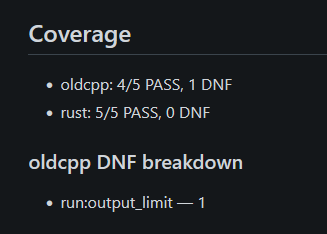
As you can see, my compiler (cowc) successfully compiled all five programs from the test suite:
https://git.seppjm.com/seppdroid/COW-Apps
The C++ compiler, however, only managed to compile four. The remaining program produced incorrect output and also triggered the memory leak in the benchmarking script. In the results it shows up as DNF (did not finish).

We’ll take a closer look at that specific case later, and figure out what’s actually going on.
But for now, let's continue
Compiling the compilers:
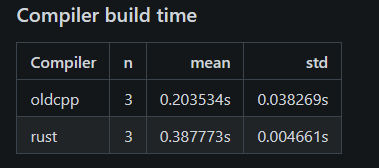
Not very important, as the compiler normally stays and doesn't need recompiling.
Compiling .cow to binary with the cowc and c++ cowcomp compilers:
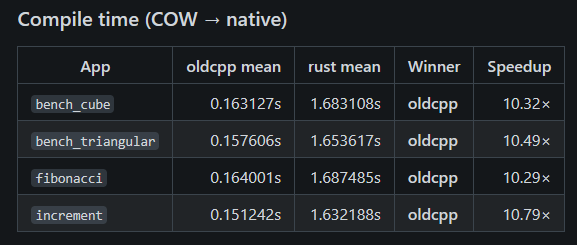
In this case, cowcomp (the C++ compiler) comes out ahead. The cowc compiler build here compiled with the --lto flag; I’ll also share results without LTO enabled to see how much of a difference that makes.
But now the most important part, how fast are the compiled applications?
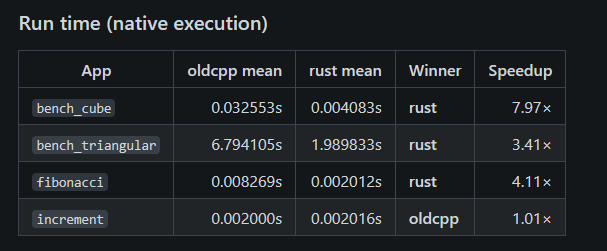
This was really interesting to see: the Rust-based cowc compiler produces faster binaries from the same source code. For something as simple as increment, the difference is negligible.
And both versions produce identical output from the input:

Read the full report here: https://git.seppjm.com/seppdroid/cowc-bench/src/branch/main/results/2026-02-20T014139Z/report.md
and the inputs that the bench wrapper gave the apps: https://git.seppjm.com/seppdroid/cowc-bench/src/branch/main/runner/cases.json
{
  "apps": [
    { "name": "bench_triangular", "file": "bench_triangular.cow", "stdin": "20000\n" },
    { "name": "bench_cube",       "file": "bench_cube.cow",       "stdin": "80\n" },
    { "name": "bench_indirect",   "file": "bench_indirect.cow",   "stdin": "20000000\n" },
    { "name": "fibonacci",        "file": "fibonacci.cow",        "stdin": "20\n" },
    { "name": "increment",        "file": "increment.cow",        "stdin": "2000\n" }
  ],
  "repetitions": {
    "build_compiler": 3,
    "compile_app": 5,
    "run_app": 5
  }
}
And no LTO?
Let's disable the LTO flag and check the results:
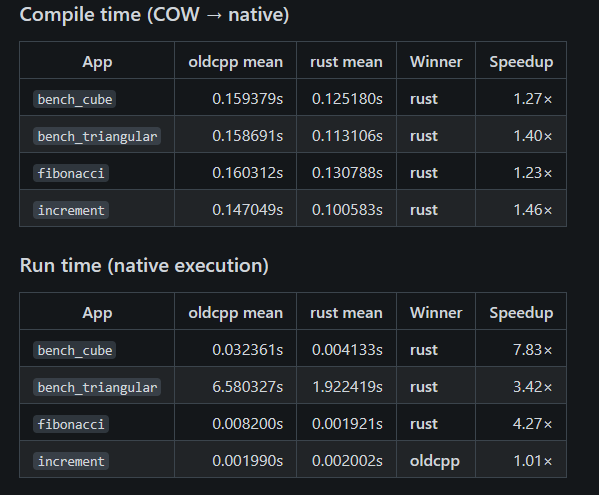
That’s a result I didn’t expect: the execution time difference is negligible, while cowc (Rust) compiles faster. It makes me wonder whether adding LTO was worth the implementation effort in this case.
Read full report: https://git.seppjm.com/seppdroid/cowc-bench/src/branch/main/results/2026-02-20T174119Z/report.md
The last check i wanted to do was try to see if running them apart and not at the same time (rust and c++) makes a difference:
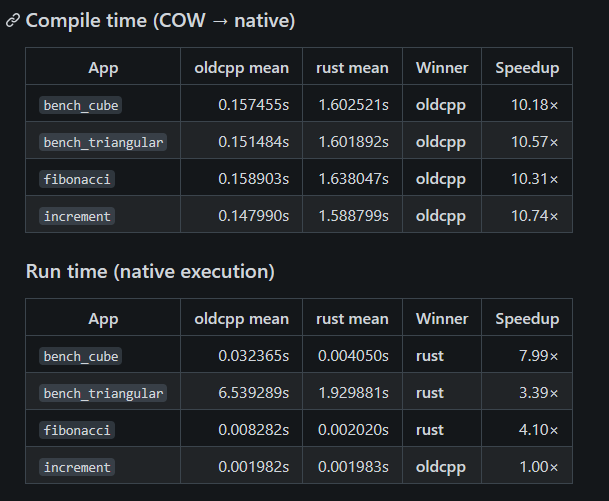
also negligible.
So now the report on comparing the reports (generated by AI to keep the vibe of this article, and saving me time ;)):
1) Reliability / completion
- Rust: 5/5 PASS in every run.
- Old C++: 4/5 PASS in every run.
- The failing case is always
bench_indirectwith DNF due to output capture limit exceeded (output_limit).
- The failing case is always
Comment: This is a practical win for the Rust toolchain: it completes the full suite under the current harness settings. The old compiler’s failure looks like a harness/output-volume issue rather than a wrong-result bug, but it still prevents apples-to-apples comparisons on that benchmark.
2) Correctness (where both complete)
For the 4 apps that pass on both compilers (bench_cube, bench_triangular, fibonacci, increment), outputs match across runs.
Comment: This is the “minimum bar” for performance comparisons: on the shared subset, the two toolchains behave the same from the harness’s point of view.
Performance summary
Runtime (native execution): Rust wins big on heavy benchmarks
Using the latest run (2026-02-20T174421Z) as representative:
| App | oldcpp runtime (s) | rust runtime (s) | Speedup (oldcpp / rust) |
|---|---|---|---|
bench_cube | 0.0325 | 0.00404 | 8.0× faster |
bench_triangular | 6.51 | 1.90 | 3.4× faster |
fibonacci | 0.00821 | 0.00200 | 4.1× faster |
increment | 0.00198 | 0.00198 | ~1.0× (tie) |
Comment: The pattern is consistent: Rust is dramatically faster on the “real work” programs, while a tiny micro-benchmark like increment is effectively noise-level / tied.
Compile time (COW → native): a major improvement after a flag change
Across the day, Rust compile time changes a lot:
- Early runs: Rust compilation averages ~1.6s vs oldcpp ~0.16s → oldcpp is ~10× faster to compile.
- Later runs: Rust compilation averages ~0.116–0.117s vs oldcpp ~0.154–0.156s → Rust is ~1.3× faster to compile.
The later runs include a note indicating Rust compiler flags were changed “without LTO”, which aligns with the step-change in compile time.
Comment: This is the biggest “engineering” takeaway: turning off LTO massively improves iteration speed, and the runtime advantage stays large in this dataset.
Compiler build time
Building the compiler itself:
- oldcpp: ~0.17–0.20s
- rust: ~0.38–0.39s (≈ 2.2× slower)
Comment: This is small in absolute terms, but if you rebuild the compiler often, it’s noticeable. It didn’t vary much across runs.
Caveats
bench_indirectis not comparable (oldcpp never completes due tooutput_limit). Any conclusions exclude that benchmark until the harness/output is adjusted.- One run notes the two containers were run separately (cpp then rust). That can introduce minor noise, but the observed differences (e.g., ~10× compile-time swing; ~3–8× runtime gaps) are far larger than typical background variance.
- Peak memory isn’t captured (reported as
-), so there’s no memory comparison yet.
View all the reports/results here: https://git.seppjm.com/seppdroid/cowc-bench/src/branch/main/results
What happened with bench_indirect?
It runs and produces the correct output when compiled with cowc, but what happens when it's compiled with cowcomp.cpp?
Let's try it ourself:
After applying the same patches used in the benchmarking wrapper and compiling with cowcomp.cpp, running bench_indirect results in a flood of Runtime error. messages:
Runtime error.

Runtime error.

Runtime error.

Runtime error.

Runtime error.

Runtime error.

Runtime error.

Runtime error.

Runtime error.

Runtime error.

Runtime error.

...
The program continues doing this until it gets killed, which explains the memory ballooning. the benchmarking script was simply filling up memory with the excessive output.
But why doesn't this happen with my rust cowc compiler?
There seems to be a codegen bug in cowcomp.cpp’s implementation of mOO (indirect execution).
While compiling the switch for mOO, it recursively calls compile() for all opcodes, including the loop opcodes moo (0) and MOO (7). Those loop cases mutate the global label counters (moocount, MOOcount) even when advance == false, i.e. even though they’re only being emitted as templates inside the switch. That shifts the numbering of labels for the real loops later in the file, so the “real” MOO/moo jumps end up targeting labels that were created inside the mOO switch, or otherwise don’t line up, which produces a runtime rterr() (or worse control flow).
This happens even if the indirect cell value is 9 (MMM) and you never execute case 0/7 at runtime, because the bug is introduced at compile time during code generation.
mOOcodegen emitsswitch(*p)and callscompile(0,false)…compile(11,false).- But
compile()for opcode 0/7 incrementsmoocount/MOOcountand emits labels unconditionally.
The benchmark program is exactly designed to stress indirect execution inside a loop (mOO mOO in the loop body).
Meanwhile, cowc.rs mirrors cowcomp.cpp's quirks, with virtual loop matching without letting that contaminate the “real” loop structure/labeling. By precomputing “virtual” loop matches for a hypothetical moo/MOO at every instruction index, indirect execution can jump correctly without concerning the real loop label space.
Unrelated to this runtime error, cowcomp.cpp generates C++ that modern compilers dislike in two ways:
- the generated file uses
atoibut doesn’t include the right header (<cstdlib>/<stdlib.h>), and - it emits labels like
m1:right before}inside acase, which is invalid in standard C++ unless followed by a statement (e.g.m1: ;).
So this was an mix of patching by the wrapper and existing bugs... And the finisher of my "Purple cow" example.
Primes?
I think I’m going to stop the project here. I somehow drifted from “let’s add COW to Dave’s Prime Drag Race” to “I’m going to write a COW compiler in Rust.”
I’ll definitely come back to it someday, and I might clean things up and submit a conditioned PR to add COW for proper prime benchmarking.
But for now,
Proost,